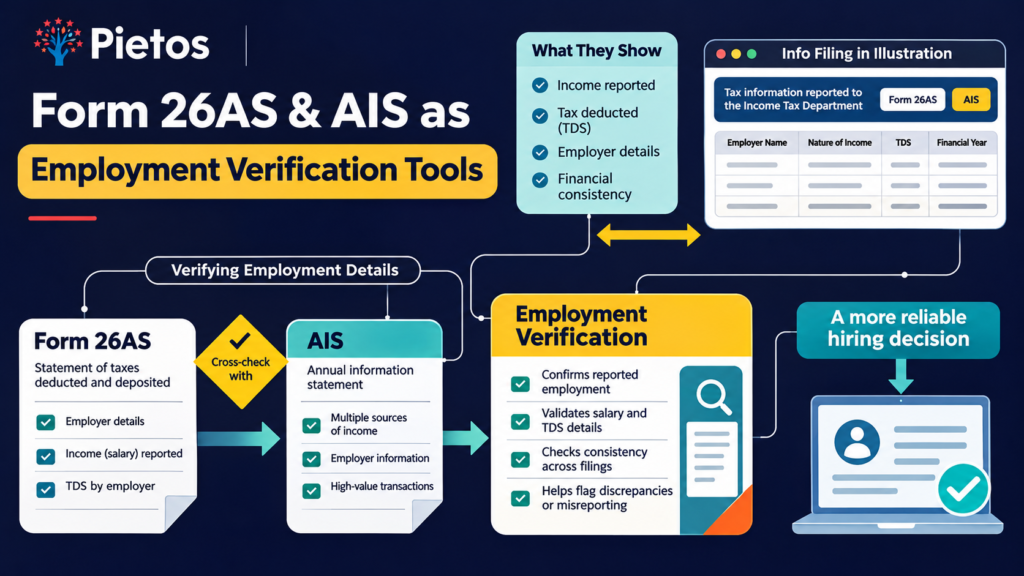
Form 26AS employment verification gives HR something payslips never can. It shows income that a former employer reported to the tax department. A candidate can edit a PDF in minutes. However, a candidate cannot edit what an employer filed with the government.
This guide explains how Form 26AS and the Annual Information Statement (AIS) work. It also covers what they confirm, where they fall short, and how to request them legally in India. Finally, you get a three-source protocol that pairs 26AS with UAN and payslip checks.
Key takeaways
- Form 26AS shows the salary and TDS that employers reported, so candidates cannot easily fake it.
- The statement now appears as Form 168 under the Income-tax Rules, 2026.
- HR can only ask candidates to share it. Never ask for login details or OTPs.
- Ask for the employer rows only. AIS shows far more than HR needs.
- Form 26AS misses some employers, so pair it with UAN and payslip checks.
Need this check without the extra workload? Pietos reconciles Form 26AS, UAN and payslips in one managed workflow. Talk to the Pietos verification team.
Why Payslips Alone Fail Salary Verification
Salary claims drive offers. Therefore, a false claim costs real money. Suppose a candidate inflates last pay by 40%. Your offer then anchors to a number that never existed. Over three years, that gap adds up.
Payslips are the usual proof. Yet candidates control them. They can edit a PDF, regenerate a slip, or buy a template. Our guide on payslip fraud India red flags lists the document-level tells HR should check first.
Document checks still have a ceiling. A clean payslip proves nothing about what the employer actually paid. For that reason, HR needs a source the candidate did not create.
The risk is not theoretical. People Matters reported a startup founder’s allegation that her marketing head submitted forged salary slips. Her team found the problem only after a close review of his documents.
Form 26AS fills this gap. Employers file TDS returns with the tax department. The department then shows that data in the candidate’s own statement. As a result, Form 26AS employment verification tests a claim against the employer’s filing, not the candidate’s folder.
What Is Form 26AS, and Why Does HR Care?
Form 26AS is a tax credit statement. It links to a person’s PAN. It lists tax that other parties deducted on that person’s behalf.
For salaried staff, the key entry is the employer’s TDS. That row names the employer and shows the employer’s TAN. It also shows the salary the employer reported and the tax the employer deducted. Banks and other payers add rows too, but HR can mostly ignore those.
Form 26AS Is Now Form 168
The tax department’s own FAQ now lists the statement as Form No. 168, earlier Form 26AS, under the Income-tax Rules, 2026 (official FAQ). Still, most candidates and many websites say “26AS”. So use both names in your consent form and candidate instructions. That small step avoids confusion.
What AIS Adds to Form 26AS
The Annual Information Statement (AIS) goes further. According to the same FAQ, banks, employers, mutual fund companies, stockbrokers and property registrars all report to it. The statement shows TDS and TCS data, financial transaction reports, tax payments, demands and refunds. It also carries other information, such as salary data, interest, dividends, securities trades and foreign remittances.
Its companion, the Taxpayer Information Summary (TIS), gives category-wise totals. For example, TIS shows total salary income for the year.
For HR, AIS is useful because it can fill gaps in 26AS. However, AIS also exposes private details. You do not need a candidate’s mutual fund trades or overseas remittances. We cover how to avoid collecting them in the DPDP section below.
How Form 26AS Employment Verification Exposes Inflated Salaries
Consider a simple case. A candidate claims ₹18 lakh per annum at their last job. HR asks for the candidate’s Form 26AS for the last full financial year. The employer row shows ₹9 lakh reported as salary. That is half the claim.
Now HR has a specific question to ask. It is not an accusation. It is a reconciliation request.
What HR Reads in the Employer Row
Focus on four fields:
- Employer name and TAN. Does it match the company on the resume?
- Amount reported. Does it fit the claimed pay for that period?
- Tax deducted. Does the tax level fit that income?
- Reporting period. Does the employer’s filing cover the claimed tenure?
These four checks take only minutes. Moreover, they need no tax expertise.
Why CTC and Form 26AS Never Match Exactly
A candidate’s CTC includes items that never reach the taxable salary line. Employer PF and insurance are examples. Unpaid variable pay also drops out.
For instance, take a simplified ₹18 lakh CTC. It has ₹14.4 lakh fixed pay, ₹2.4 lakh variable pay and ₹1.2 lakh employer PF. The reported salary may land near ₹16.8 lakh, depending on payouts and exemptions. A ₹9 lakh figure leaves a large gap that this structure cannot explain.
Therefore, always compare the right numbers. Ask for the CTC breakup first. Then compare it with the 26AS figure.
What Form 26AS Can Confirm, and What It Cannot
Be honest with your team about limits. A tool that HR over-trusts creates new risk. The table below sets realistic expectations.
| Question HR asks | Does 26AS or AIS answer it? | Notes |
|---|---|---|
| Did this employer file TDS for the candidate? | Yes | Shows employer name and TAN |
| How much salary did the employer report? | Yes | Compare with the CTC breakup, not CTC alone |
| Did the candidate work in the claimed months? | Partly | Shows the reporting period, not daily attendance |
| Did the candidate have a second employer? | Partly | Only if that employer reported income or deducted TDS |
| Did the candidate earn freelance income? | Sometimes | Appears mainly when the client deducted TDS |
| Why did the candidate leave? | No | Needs a reference check |
| Was the designation accurate? | No | Needs employer confirmation |
| Does the candidate have a clean record? | No | Needs criminal and court checks |
In short, 26AS confirms money. It does not confirm roles, conduct or reasons for leaving. Hence, treat it as one layer in a stack.
Employment gaps need care too. A gap in employer rows can hint at a gap in work. However, it can also mean the candidate earned below the level where TDS applies. So ask before you assume.
Salary claimed doesn’t match what you’re verifying? Pietos’ employment history checks cross-reference multiple income data sources for a complete picture. Talk to Pietos
Can HR Legally Request Form 26AS From a Candidate?
In most hiring settings, yes, with the candidate’s informed consent. Indian law does not bar an employer from asking a candidate to share their own tax statement voluntarily. This is general guidance, not legal advice, so check with counsel for your sector.
The tax department does not release a candidate’s statement to employers. Instead, the candidate logs in and downloads it. That makes consent the foundation of the whole process.
Consent and the DPDP Act
Tax data is personal data. Therefore, the Digital Personal Data Protection Act, 2023 applies to how you collect, use and store it. MeitY hosts the Act. The DPDP Rules, 2025 phase in the remaining obligations over 18 months, so full compliance arrives by May 2027. Smart HR teams build the consent flow now.
Use this checklist:
- Give the candidate a clear notice that says what you collect and why.
- State one purpose: salary and employment verification.
- Capture consent that the candidate can withdraw.
- Tell the candidate how long you keep the file.
- Store the file securely and delete it on schedule.
- Log the consent so you can show it in an audit.
Ask for Employer Rows Only
The best practice is data minimisation. Ask for the salary pages only. Candidates can share a trimmed file that hides unrelated rows.
Skip the full AIS unless you have a strong reason. It shows investments, dividends, property deals and foreign remittances. HR has no need for any of that. Besides, more data means more breach liability.
What HR Must Never Ask For
Never ask for a candidate’s portal password, login or OTP. Sharing credentials is unsafe for the candidate. It also exposes your company. Instead, tell candidates to download the file themselves and send it through a secure channel.
For download steps, point candidates to the official income tax e-filing portal and the TRACES portal. The ClearTax Form 26AS download guide also explains the steps in plain language.
The Three-Source Cross-Check: Form 26AS, UAN and Payslips
No single document proves everything. So Pietos recommends a three-source cross-check. Each source fills a hole in the other two.
| Source | What it proves | Who creates the file | Forgery difficulty |
|---|---|---|---|
| Payslips | Pay components for one month | Candidate or employer | Easy |
| UAN and EPFO passbook | Employers and months of PF contribution | EPFO data, filed by employers | Hard |
| Form 26AS and AIS | Salary and TDS the employer reported | Tax department data | Hard |
UAN shows tenure. Our UAN verification guide explains how HR reads PF contributions month by month. Form 26AS shows income. Payslips show how the pay breaks up. Together, the three form a triangle that is hard to bend.
How the Triangle Works in Practice
- Start with the payslips. Run the basic checks from our payslip fraud guide.
- Pull the UAN history. Confirm employer names and contribution months.
- Request the 26AS employer rows. Confirm the employer and the reported amount.
- Compare the UAN tenure with the 26AS reporting period.
- Compare the payslip gross with the 26AS salary figure.
- Flag every gap, then ask the candidate to explain it.
Our salary verification methodology India guide shows how this stack fits into a full SOP. It also explains where each document can still be gamed.
Why Two Government Sources Beat One
UAN covers PF-linked employment. Form 26AS covers income that employers report for tax. Because the two systems differ, a gap in one often shows up in the other. For example, a fake employer may produce a payslip and a letter. However, it will struggle to produce matching UAN and TDS records.
Why Form 26AS Employment Verification Resists AI-Generated Forgery
AI has changed document fraud. Image and text models now produce payslips and bank statements with believable fonts, logos and arithmetic. Advanced models such as GPT-6 Astra raise the bar further. As a result, a visual check alone no longer works.
Form 26AS employment verification helps because the data lives on government systems. The candidate downloads it from a logged-in portal. A forger cannot simply generate a new statement from a prompt. Instead, a forger would have to alter a downloaded file. In addition, any altered figure must still match the employer’s TAN, the UAN history and the payslips.
Still, be honest about one weak spot. A downloaded PDF is still a file, and a determined forger can edit it. Therefore, add one of these safeguards:
- Ask the candidate to download the statement live on a video call.
- Ask a verification partner to view it with the candidate’s consent.
- Cross-check the figures against UAN data and the former employer.
With these steps, forging a consistent story across three sources becomes expensive and risky.
Limitations of Form 26AS Employment Verification
No verification tool is perfect. Knowing the limits protects both the candidate and your company.
- Missing TDS rows. Some employers deduct no tax when pay falls below the taxable level. Those employers may not appear in 26AS. AIS can help in some cases, but not always.
- Filing lag. Employers file TDS returns every quarter. Therefore, the latest months may not show yet.
- Employer errors. A wrong PAN or a late filing can hide an honest candidate’s income. As a result, mismatches need questions, not verdicts.
- Mid-year job changes. Two employers in one year split the picture. Add up both rows before you judge.
- Freelance and cash income. These appear only when the payer deducted TDS and reported it.
- No role data. The statement says nothing about designation, performance or reasons for leaving.
Because of these limits, never reject a candidate on a 26AS mismatch alone. Ask first. Then decide with all the evidence.
A Practical Protocol: When to Request Form 26AS and How to Read Gaps
When to Request Form 26AS
Do not run this check for every hire. Instead, use a risk-based approach. Request Form 26AS in these cases:
- Senior hires, where past pay sets the offer.
- Roles with cash or credit exposure. Our financial credit background check India guide covers these roles.
- Candidates whose salary claims jump sharply between jobs.
- Lateral hires in regulated sectors such as NBFCs and fintech.
- Roles where side income matters. Form 26AS can reveal secondary income that candidates must declare, as our post on moonlighting declarations as a BGV step explains.
How to Run the Check Step by Step
- Send the consent notice. Name both “Form 26AS” and “Form 168”.
- Ask for the employer rows for the last one or two financial years.
- Collect the CTC breakup and the joining and exit dates.
- Match the employer name and TAN with the resume.
- Compare the reported salary with the CTC breakup.
- Compare the period with UAN tenure.
- Record every gap in writing.
- Give the candidate a fair chance to explain.
How to Read Common Discrepancies
| What you see | Likely cause | Next step |
|---|---|---|
| 26AS salary far below the claim | Inflated CTC, or a part-year | Ask for the CTC breakup and the joining and exit dates |
| Employer name differs from the resume | Group company payroll or a name change | Check company records and ask the candidate |
| Extra employer not on the resume | Short stint left off, or undisclosed work | Ask directly and cross-check UAN |
| No row for a claimed employer | No TDS deducted, or a fake employer | Check UAN, payslips and direct employer contact |
| Gap months with no entries | A real gap, or low income | Ask for an explanation and check UAN |
| Latest months missing | Filing lag | Ask for Form 16 or recent payslips |
Fairness matters here. Record the candidate’s explanation next to the evidence. Pietos delivers a documented discrepancy trail with every report, so your decision stands up in an audit.
Real-World Scenarios
These three scenarios are illustrative composites, not client data. They show how the protocol works in practice.
Scenario 1: The ₹18 LPA Claim
A sales manager claims ₹18 lakh at the last job. The payslips look clean. However, the 26AS employer row reports ₹9 lakh for a full year. The candidate says variable pay explains the gap. Yet the CTC breakup shows only ₹2 lakh variable. HR rebuilds the offer on the verified figure. As a result, the company avoids a costly salary anchor.
Scenario 2: The Hidden Employer
A candidate lists a six-month career gap. AIS, however, shows salary data from an employer that the resume omits. HR asks about it. The candidate admits a short stint that ended in a termination. The role is not sensitive, so HR hires after a documented discussion. Here, the check improved honesty rather than ending the process.
Scenario 3: The False Alarm
A candidate joined the last employer in September. The 26AS row shows seven months of salary, which looks low. At first, HR suspects inflation. Then the joining letter and UAN history explain it. The candidate moves ahead. This case proves why context comes before conclusions.
Business Risks and the Cost of Inaction
Skipping income verification feels cheap. However, the costs arrive later and compound.
- Overpaid offers. Increments apply to the base. Suppose a candidate inflates pay by ₹1 lakh and gets 10% yearly increments. Over three years, the excess pay reaches about ₹3.3 lakh.
- Broken pay bands. An inflated hire resets internal benchmarks. Peers notice, and fairness complaints follow.
- Compliance exposure. Regulated employers, such as banks and NBFCs, face expectations for antecedent checks. Weak income checks leave gaps in your audit file.
- Fraud that spreads. A candidate who inflates salary may misstate other facts too. Pietos has seen this pattern in fake payslip and fabricated degree cases.
- Privacy penalties. The DPDP Act allows penalties up to ₹250 crore for failing to keep reasonable security safeguards. Collecting more tax data than you need raises that risk.
The benefits run the other way. Verified pay history speeds up offers. It also sharpens benchmarking, strengthens your audit trail and deters fraud before it starts.
Buyer Objections and Responses
| Objection | Response |
|---|---|
| “This feels intrusive.” | Use consent, one stated purpose and employer rows only. That keeps the check proportionate. |
| “Candidates will refuse.” | Refusal is not proof of fraud. Offer alternatives such as Form 16, bank credits and UAN history. |
| “We already check payslips.” | Candidates control payslips. Form 26AS adds data that the employer reported. |
| “Our team cannot read tax forms.” | The four-field read takes minutes. Alternatively, a partner can run it for you. |
| “It will slow hiring.” | Candidates download the file in minutes. Pietos digital checks typically finish in 24–48 hours. |
| “What if 26AS is wrong?” | Treat a mismatch as a question, not a verdict. Then reconcile with UAN and the employer. |
Why Teams Trust Pietos for Salary and Employment Verification
Pietos Solutions Private Limited is an MSME-certified background verification company. It serves NBFCs, startups and GCC setups across India. Its hybrid model combines digital checks with field verification in tier 2 and tier 3 cities.
For salary and employment checks, the Pietos process covers:
- Form 16 and 26AS reconciliation
- EPFO and UAN wage cross-checks
- Direct employer contact
- Consent capture with audit logs
- A documented discrepancy trail with every report
You get a clear, defensible record for every hire.
Related Resources
| Anchor text | Destination | Reason for linking |
|---|---|---|
| Payslip fraud India red flags | pietos.com/payslip-fraud-india-red-flags-hr/ | 26AS is the verification antidote to payslip fraud |
| Salary verification methodology India | pietos.com/salary-verification-india-hr/ | 26AS is the most powerful tool in the salary verification toolkit |
| UAN verification guide | pietos.com/uan-verification-guide/ | UAN plus 26AS is the two-source employment verification standard |
| Moonlighting declarations as a BGV step | pietos.com/moonlighting-declaration-verification-bgv-india/ | 26AS reveals secondary income that candidates must declare |
| Financial credit background check India | pietos.com/financial-background-check-india/ | Financial verification cluster, where 26AS is the most underused tool |
FAQ: Form 26AS Employment Verification
Form 26AS employment verification is the process of checking a candidate’s salary and employer history against the tax statement. HR compares the employer name, reported salary and tax deducted with the candidate’s claims. The data comes from employer filings, so it is harder to fake than a payslip.
Yes, an employer can ask a candidate to share it voluntarily. The candidate must give informed consent, and the employer must follow the DPDP Act. Never ask for login details or OTPs.
The tax department’s FAQ lists Form No. 168 as the new name under the Income-tax Rules, 2026. Many candidates and websites still say “26AS”. So use both names in your instructions.
Form 26AS focuses on tax credits such as TDS. AIS covers more. It includes interest, dividends, securities trades and foreign remittances. For hiring, ask for the employer rows only.
No. It may miss employers that deducted no TDS. Filing lags can also hide recent months. Therefore, pair it with UAN history and payslips.
A candidate could edit a downloaded PDF. However, the figures must still match the employer’s TAN, UAN history and payslips. Ask for a live download or use a verification partner to close the gap.
Ask the candidate to explain. Request the CTC breakup, Form 16 and joining dates. Then reconcile with UAN and the former employer. Record every step.
UAN confirms tenure, 26AS confirms reported income, and payslips show the pay structure. Together they form a three-source cross-check.
Conclusion: Verify Salary With Data the Employer Reported
Form 26AS employment verification turns a salary claim into a testable fact. It works because employers, not candidates, supply the data. Even so, it works best inside a stack. Pair it with UAN history, payslip checks and direct employer contact.
Remember three rules. Get consent first. Collect employer rows only. Treat every mismatch as a question before you treat it as fraud.
Ready to verify salary claims with confidence? Pietos cross-checks Form 26AS, UAN and payslips, then hands you a documented discrepancy trail. Book a verification consultation or write to contact@pietos.com.